


Data points are physical network sockets (like Ethernet ports) installed in walls to provide a direct, wired connection to your home or office internet network. Wall plates are the visible plastic or metal covers mounted on the wall that protect these connections, organize the wires, and match your interior decor.
Data points and wall plates are essential components in modern connectivity, ensuring a stable and reliable network connection within homes and businesses. Whether you’re setting up a home network, upgrading an office infrastructure, or enhancing your internet access, correctly installing wall plates and data points extends connectivity, reduces latency, and optimizes the smooth flow of information.
Understanding how these elements work together is crucial for a seamless internet experience.
What Is a Data Point and Why It Matters in Modern Connectivity
Data points are essential in residential and commercial settings as they provide stable and direct connections for various devices. Unlike Wi-Fi, which can be affected by interference and bandwidth limitations, a properly installed data point extends your internet signal, offering high-speed internet with minimal buffering.
Understanding Data Points and Their Role in Home and Business Networks
A data point is a wired connection used to connect devices such as gaming consoles, smart TVs, computers, and security cameras directly to a network. This ensures a strong and reliable connection, essential for activities requiring low latency, such as online gaming and video conferencing. Installing data points and wall plates correctly can improve internet access and prevent issues like buffering and slow speeds.
How a Wall Plate Enhances Cable Management and Aesthetic Appeal
Wall plates come in various designs and are used to organize and protect wiring within homes and offices. Electrical wall plates not only prevent physical damage to cables but also enhance safety by keeping power cables and data cabling neatly routed through the walls. A well-placed data wall plate ensures a seamless and clutter-free network setup while maintaining the integrity of electrical systems.
Types of Data Points and Wall Plates for Every Setup
Selecting the right data point and wall plate setup is essential for achieving reliable and efficient network performance. Various devices, including gaming consoles, smart TVs, and security cameras, require different types of connections to function optimally.
Ethernet Data Points for Faster and More Stable Connections
Ethernet data points are commonly used to connect devices directly to a modem or router, ensuring high-speed internet access without interference. Unlike Wi-Fi, Ethernet reduces latency and provides a smooth flow of information within a network, making it ideal for businesses and homes requiring strong, stable connectivity.
Choosing the Right Wall Plate for Your Data Point Installation
Wall plates come in various types, including electrical wall plates, coaxial plates for cable TV connections, and RJ45 plates for network setup. When choosing a wall plate, consider factors such as the number of cable outlets needed, conduit placement, and the type of wiring required for your electrical needs.
Custom Solutions: Data Point Cabling for Homes, Offices, and Businesses
Professional data cabling services ensure that data points are placed strategically to optimize network performance. A qualified electrician can help determine the ideal placement of data points, whether for residential or commercial settings, ensuring minimal interference and maximum efficiency.
Installing Data Points and Wall Plates: Step-by-Step Guide
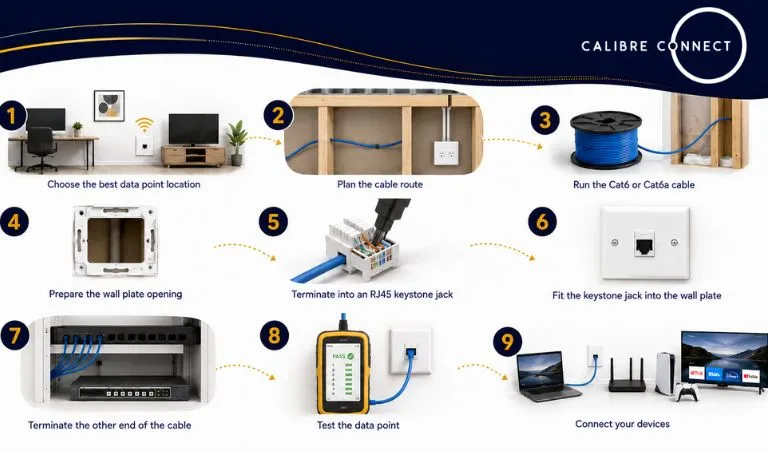
Installing a data point involves running a structured data cable from a central networking location to a wall outlet, terminating the cable into an RJ45 data jack, fitting it into a wall plate, and testing the connection. For fixed cabling inside walls, ceilings or roof spaces, this work should be completed by a registered cabler to ensure the installation is safe, compliant and reliable.
Step 1: Choose the Best Data Point Location
The first step is deciding where the data point should be installed. Common locations include home offices, TV units, gaming areas, Wi-Fi access point positions, security system locations and rooms with poor wireless coverage.
The outlet should be placed somewhere practical, accessible and close to the devices that need a stable wired connection. The installer will also consider the cable route back to the modem, router, network switch or communications cabinet.
Step 2: Plan the Cable Route
Once the outlet location is confirmed, the cable route needs to be planned. This may involve running cable through a wall cavity, ceiling space, roof space, subfloor area or internal conduit.
Data cabling should be kept away from electrical cabling where required, as running network cables too close to mains wiring can increase interference and may create compliance issues. A proper cable route also avoids sharp bends, crushed cable and unnecessary joins.
Step 3: Run the Cat6 or Cat6a Cable
The next step is running the data cable from the central network point to the wall outlet location. Cat6 is commonly used for residential and small business data points, while Cat6a may be used where higher performance or future capacity is required.
Enough cable is left at the wall outlet and network end so it can be terminated properly without placing strain on the connection. The cable should be supported neatly and protected from damage where it passes through framing, ceiling spaces or access points.
Step 4: Prepare the Wall Plate Opening
A wall plate location is then prepared at the selected outlet position. This may involve fitting a mounting bracket, plaster clip or wall box, depending on the wall type and installation method.
The goal is to create a clean, secure mounting point so the finished data point sits neatly on the wall and does not move when devices are plugged in or removed.
Step 5: Terminate the Cable Into an RJ45 Keystone Jack
The cable is then stripped back carefully and terminated into an RJ45 keystone jack. The internal twisted pairs are placed into the correct colour-coded slots and punched down securely using the appropriate termination tool.
A clean termination matters because poor workmanship can cause slow speeds, connection dropouts or failed cable tests. The wire pairs should remain twisted as close as practical to the termination point to help maintain signal quality.
Step 6: Fit the Keystone Jack Into the Wall Plate
After the cable is terminated, the RJ45 keystone jack is clipped into the wall plate. The excess cable is carefully placed back into the wall cavity without crushing or sharply bending it.
The wall plate is then screwed into position and aligned neatly. The screws should be firm but not overtightened, as overtightening can crack the plate or distort the fitting.
Step 7: Terminate the Other End of the Cable
The other end of the cable is then terminated at the modem, router, network switch or patch panel location. In a more organised setup, the cable may be terminated into a patch panel inside a communications cabinet.
Each cable should be clearly labelled so the wall outlet can be matched to the correct network port. This makes future troubleshooting, upgrades and device changes much easier.
Step 8: Test the Data Point
Once both ends are terminated, the data point should be tested using a cable tester. This checks that the pins are mapped correctly and helps identify faults such as crossed wires, split pairs, open circuits or poor terminations.
Testing is an important final step because a data point can look complete on the wall but still perform poorly if the cable has been damaged or terminated incorrectly.
Step 9: Connect Your Devices
After the data point passes testing, it can be connected to your network equipment. A patch lead can be used to connect the wall outlet to a computer, smart TV, gaming console, Wi-Fi access point or other network device.
A properly installed data point gives you a more stable connection than Wi-Fi alone, making it useful for streaming, working from home, video calls, gaming, security systems and other devices that rely on consistent internet performance.
Essential Tools and Materials for Data Point Installation
- Cables: Ethernet, coaxial, or fibre optic cables, depending on network requirements.
- Wall plates: Electrical wall plates, RJ45 plates, and conduit fittings.
- Drill and screwdriver: Essential for in-wall installations and securing wall plates.
- Network tester: Used to verify proper connection and diagnose potential malfunctions.
- Meter and switchboard tools: Necessary for electrical system adjustments during installation.
DIY vs. Hiring an Electrician: What You Need to Know
While some homeowners attempt DIY installation, hiring a licensed electrician ensures compliance with safety regulations and a properly routed network setup. Professional electrical services can prevent potential hazards and ensure that the data point installation is performed correctly, especially when rewiring or working with electrical points.
Electrical Work Considerations When Installing Data Points and Wall Plates
Data points must be installed in a way that prevents electrical interference and allows seamless connectivity. Proper data cabling and wiring should be planned alongside power cables and other electrical needs, such as lighting fixtures, ceiling fans, and smoke detectors, to avoid interference.
Data Point Installation Best Practices for a Seamless Setup
Ensuring a seamless and efficient network requires strategic planning and professional installation. Proper placement and cabling techniques contribute to a reliable and high-speed internet experience.
Proper Cable Routing to Avoid Signal Interference
Data cabling should be routed away from electrical systems to prevent signal degradation. Shielded cables and conduit protection can help maintain signal integrity and prevent data loss, ensuring a smooth network connection across multiple devices.
Positioning Data Points for Optimal Network Performance
- Avoid placing data points near electrical points to prevent interference.
- Ensure a direct connection from the modem or router to another point to optimize bandwidth.
- Install data points near commonly used devices like gaming consoles and smart TVs for the best performance.
- Consider in-wall or outdoor lighting-friendly installations to maintain aesthetics and functionality.
Common Mistakes to Avoid When Installing Data Points and Wall Plates
- Incorrectly installing RJ45 connectors can result in network failures.
- Improper placement of data wall plates may lead to connectivity issues.
- Failing to account for future upgrades can limit network expansion options.
- Neglecting to test data points after installation may cause hidden problems that affect performance.
Troubleshooting Data Points and Wall Plate Connectivity Issues
Even with professional installation, occasional troubleshooting may be necessary to maintain a stable network connection. Identifying common issues can help prevent major disruptions.
Diagnosing Ethernet and Cabling Problems
- Check for loose or disconnected cables within wall plates.
- Test network performance using a bandwidth meter.
- Inspect the switchboard and modem connections for potential malfunctions.
- Ensure that the router firmware is up to date.
When to Call an Electrician for Data Point Cabling Repairs
If you experience frequent disconnections, slow internet speeds, or damaged cable outlets, it’s best to contact a qualified electrician. Electrical services can diagnose and fix in-wall cabling issues that DIY troubleshooting may not resolve.
Quick Fixes for Wall Plate and Connection Issues
- Reset the modem or router to refresh the internet signal.
- Replace damaged wall plates to prevent loose connections.
- Ensure that all network devices are correctly installed and configured.
- Verify that cables are securely connected to prevent intermittent connectivity.
Why Choose a Professional for Your Data Point Installation

The Benefits of Expert Electrical Work for Network Stability
Choosing professional installation for your data points and wall plates offers several advantages, ensuring a stable and high-speed network connection. Here’s why expert electrical work matters:
- Optimized Data Point Placement – Ensures minimal interference, maximized coverage, and improved network performance for all connected devices.
- Reduced Latency and Faster Speeds – Professionally installed data cabling eliminates common issues like signal degradation, ensuring smooth data transmission with minimal lag.
- Seamless Integration with Electrical Systems – Expert electricians can route power cables, network cables, and electrical points efficiently to prevent interference and maintain system integrity.
- Reliable and Efficient Connectivity – A well-installed network ensures consistent internet access, reducing buffering and dropouts, especially for smart TVs, gaming consoles, and business applications.
- Future-Proof Setup – Proper data point installation accounts for future network expansions and technology upgrades, ensuring long-term reliability.
- Enhanced Safety and Compliance – A licensed electrician ensures installations meet safety regulations, preventing hazards like faulty wiring, short circuits, or physical damage to cables.
- Support for Multiple Devices – Professionally installed data points allow many devices to be connected simultaneously without overloading the network setup.
For a seamless and high-performance network, trust expert electricians to handle your data cabling and electrical needs with precision and care..
Contact Us for Reliable Data Point Cabling and Installation Services
At Calibre Connect, we specialize in providing top-quality data point installation and wall plate setup for homes and businesses across Sydney. Whether you’re upgrading your network, installing new data cabling, or troubleshooting connectivity issues, our local electricians ensure a seamless and high-speed network connection. We handle everything from Ethernet data points to cable outlets, ensuring your setup is optimized for performance and reliability.
Get in touch with Calibre Connect today for expert data point cabling services tailored to your residential and commercial needs in Sydney.