



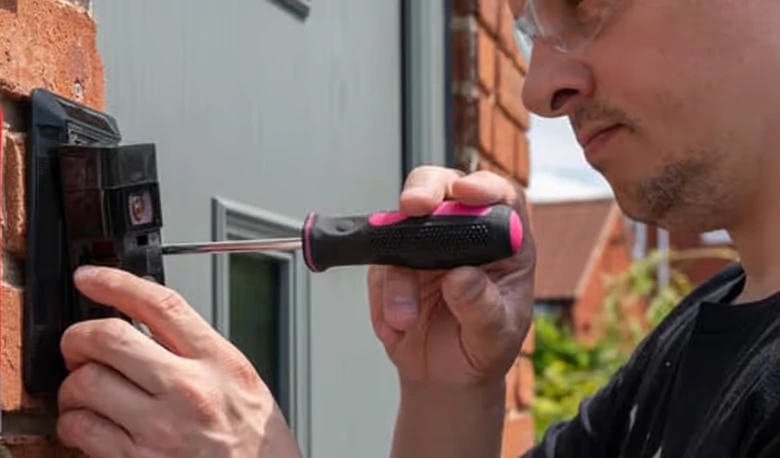
Doorbell camera installation requires selecting between wired or battery-powered options, choosing optimal mounting locations with clear visitor views, ensuring strong Wi-Fi connectivity, and following safety protocols when handling electrical connections. Professional installation by licensed electricians ensures compliance with Australian standards while maximizing security benefits.
Understanding doorbell camera installation requirements helps Sydney homeowners enhance their home security system effectively and safely. Video doorbell cameras provide real-time monitoring, two-way communication, and motion detection alerts that add a significant security layer of protection around your property. Whether choosing wired video doorbell systems requiring existing doorbell wiring or battery-powered smart doorbell cameras offering simpler installation, knowing installation essentials ensures optimal performance while deterring potential intruders. Proper video doorbell installation involves compatibility checks, strategic placement, secure mounting, and Wi-Fi integration that provides peace of mind through continuous monitoring and delivery notifications.
For professional guidance on video doorbell installation, licensed electricians ensure safe, compliant installations that maximize your home’s security capabilities.
Key Takeaways
✅ Doorbell camera installation requires choosing between wired systems using existing doorbell wiring or battery-powered options offering easier setup, with factors to consider including power source, mounting location, and Wi-Fi connection strength
✅ Professional installation by licensed electricians ensures electrical safety compliance, optimal camera placement, and integration with home security systems while providing peace of mind through guaranteed workmanship
✅ Essential installation steps include selecting locations providing clear views while able to answer the door remotely, securing mounting brackets properly, and configuring mobile app settings for motion detection and real-time alerts day or night
✅ Privacy and security considerations require positioning cameras to safeguard your property without excessive surveillance of neighbors, implementing encryption for data protection, and complying with Australian privacy regulations
Understanding Smart Doorbell Camera Options
Video doorbells come in various configurations offering different features, installation requirements, and security capabilities suited to diverse property needs and existing infrastructure.
Wired Video Doorbell Systems
Wired video doorbell cameras connect to existing doorbell wiring, providing continuous power without battery maintenance requirements while integrating with traditional chime systems inside your home.
These systems utilize low voltage power from existing doorbell transformers, typically operating at 8-24 volts suitable for residential installations. Wired installations ensure consistent operation without battery life concerns, support advanced features requiring continuous power, maintain reliable connectivity through stable power supply, and integrate seamlessly with existing doorbell infrastructure.
Wired doorbell advantages:
- Continuous power eliminates battery replacement or recharging
- Supports high-quality video streaming without power conservation modes
- Activates existing mechanical or digital chimes
- More reliable for properties with strong existing electrical infrastructure
- Suitable for permanent installations requiring professional setup
Popular models including Ring Doorbell Pro, Nest Doorbell (wired), and other wired video doorbells require compatibility verification with existing doorbell systems before installation. Transformer voltage must match camera specifications, with many systems requiring specific voltage ranges for proper operation.
| Doorbell Type | Power Source | Installation Complexity | Best For |
|---|---|---|---|
| Wired Video Doorbell | Existing doorbell wiring | Moderate to High | Permanent installations, existing wiring |
| Battery-Powered Smart Doorbell | Rechargeable batteries | Low to Moderate | Rental properties, no existing wiring |
| Hardwired with Adapter | Direct electrical connection | High | New constructions, professional installs |
Battery-Powered Video Doorbell Options
Battery-powered doorbell cameras offer flexible installation without wiring requirements, making them a popular choice for rental properties or homes lacking existing doorbell infrastructure.
These wireless systems operate on rechargeable batteries typically lasting 3-6 months depending on usage frequency and environmental conditions. Installation simplicity makes battery-powered options attractive for DIY installation, though mounting security and Wi-Fi signal strength remain critical factors affecting performance and reliability.
Battery doorbell considerations:
- Regular recharging required every few months
- Performance affected by temperature extremes
- May include power-saving modes reducing video quality
- Easier relocation if placement proves suboptimal
- No electrical work required for basic installation
Battery life depends on factors including motion detection frequency, video streaming duration, Wi-Fi signal strength requiring camera power, environmental temperature affecting battery performance, and notification settings activating camera functions.
Smart Home Integration Features
Modern video doorbell cameras integrate with smart home ecosystems, enhancing security through automation and centralized control of home security systems.
Integration capabilities include:
- Voice control through Amazon Alexa, Google Assistant, or Apple HomeKit
- Automated responses linking doorbell events to smart lighting
- Integration with smart locks for remote access control
- Coordination with security cameras creating comprehensive surveillance
- Mobile app control through phone or tablet interfaces
Smart video doorbells providing real-time alerts, live video streaming, and two-way communication become powerful security tools when integrated with broader home automation systems. Understanding home automation systems helps property owners plan comprehensive smart home security solutions.
Essential Tools and Materials for Installation
Proper doorbell camera installation requires specific tools and materials ensuring secure mounting, safe electrical connections, and optimal camera positioning.
Required Installation Tools
Different installation types require varying tool sets, with wired installations demanding electrical tools for safe wire handling.
Basic installation toolkit:
- Screwdriver set (Phillips and flathead) for mounting brackets
- Power drill for creating mounting holes in masonry or timber
- Drill bits appropriate for wall surface materials
- Voltage tester for verifying power status before wiring work
- Wire strippers for preparing electrical connections
- Level ensuring camera alignment for proper viewing angles
- Measuring tape for accurate placement and spacing
Additional items for specific installations:
- Wall anchors for secure mounting in various surfaces
- Masonry drill bits for brick or concrete walls
- Silicone sealant protecting outdoor connections from weather
- Electrical tape for securing wire connections
- Smartphone or tablet for app-based camera configuration
- Wi-Fi network information for connectivity setup
Safety Equipment and Precautions
Electrical safety equipment protects installers from shock hazards when working with doorbell wiring and power sources.
| Safety Item | Purpose | When Required |
|---|---|---|
| Voltage Tester | Verify power disconnection | All wired installations |
| Insulated Tools | Prevent electrical contact | Working with live circuits |
| Safety Glasses | Protect from drilling debris | Masonry or overhead drilling |
| Work Gloves | Protect hands during installation | All installation types |
Critical safety protocols:
- Turn off power at circuit breaker before touching existing wiring
- Verify power disconnection using voltage tester before proceeding
- Never work on electrical connections with power active
- Follow manufacturer wiring diagrams exactly as specified
- Consult licensed electricians for unfamiliar electrical work
Understanding electrical safety practices prevents installation accidents while ensuring compliant, safe doorbell camera installations.
Mounting Hardware and Surface Preparation
Secure mounting requires appropriate hardware matched to wall surface types and proper preparation ensuring long-term installation stability.
Wall surfaces common in Sydney properties include brick veneer requiring masonry anchors, timber frames accepting wood screws directly, rendered walls needing appropriate anchor types, and composite materials requiring specialized fasteners. Surface assessment determines correct mounting hardware preventing camera falls or insecure installation.
Surface-specific mounting approaches:
- Brick/masonry: Masonry drill bits, wall anchors rated for camera weight
- Timber: Direct wood screws into studs or blocking
- Stucco/render: Plastic anchors with corrosion-resistant screws
- Metal surfaces: Self-tapping screws or specialized metal anchors
Preparation includes marking precise mounting locations, drilling pilot holes at correct depths, installing anchors flush with surface, and verifying bracket security before attaching expensive camera equipment.
Step-by-Step Doorbell Camera Installation Process
Systematic installation following manufacturer specifications ensures secure mounting, proper electrical connections, and optimal camera performance.
Selecting Optimal Installation Location
Strategic placement maximizes security benefits while ensuring clear visitor views and reliable camera operation.
The installation location should provide unobstructed views of approaching visitors, typically 48-52 inches above ground level matching typical eye height. This placement captures facial recognition data effectively while providing clear views of delivery packages and activity around your property.
Location selection criteria:
- Clear view of entryway and immediate approach area
- Protection from direct weather exposure when possible
- Strong Wi-Fi connection at installation site (2.4 GHz preferred)
- Adequate lighting for day and night video quality
- Accessibility for battery changes if using battery-powered models
- Compliance with privacy regulations avoiding neighbor property surveillance
Testing Wi-Fi signal strength at proposed locations prevents connectivity issues affecting video streaming and notification delivery. Many smart doorbell cameras require consistent 2.4 GHz Wi-Fi signals, with weak connections causing delayed alerts or failed video transmission.
Properties experiencing Wi-Fi coverage issues should consider electrical solutions including network infrastructure improvements before camera installation.
Mounting and Securing the Doorbell Camera
Proper mounting ensures camera stability, correct viewing angles, and long-term installation reliability.
Installation sequence:
- Mark mounting locations using provided template or measurements
- Drill pilot holes appropriate for wall material and anchor type
- Install wall anchors ensuring flush, secure placement
- Attach mounting bracket verifying level alignment
- Connect wiring (for wired models) following color coding
- Secure camera to bracket according to manufacturer instructions
- Verify alignment ensuring proper viewing angle coverage
| Installation Step | Time Required | Difficulty Level | Professional Recommended |
|---|---|---|---|
| Location Selection | 15-30 minutes | Easy | Optional |
| Bracket Mounting | 20-40 minutes | Moderate | For masonry surfaces |
| Wired Connection | 30-60 minutes | Moderate to High | Strongly recommended |
| Camera Configuration | 15-30 minutes | Easy to Moderate | Optional |
For wired installations, electrical connections require careful attention to wire color codes and secure terminal connections. Loose wiring causes intermittent operation or complete camera failure, while incorrect polarity may damage electronic components.
Wiring Connections for Hardwired Systems
Wired video doorbell installation involves connecting camera wiring to existing doorbell circuits or new dedicated power sources.
Wiring connection process:
- Turn off power at circuit breaker controlling doorbell circuit
- Verify power disconnection using voltage tester on existing wires
- Remove old doorbell if replacing existing unit
- Identify wire functions (typically two wires: hot and neutral/return)
- Connect camera wires following manufacturer color coding
- Secure connections with wire nuts or terminal screws
- Test operation before final camera mounting
Existing doorbell wiring typically provides 8-24V AC power through transformers located at electrical panels or junction boxes. Verify transformer voltage matches camera specifications before connecting, as voltage mismatches cause operational problems or equipment damage.
Wiring safety requirements:
- Never work on live electrical connections
- Use appropriate wire connectors for secure joints
- Protect connections from weather exposure
- Follow Australian electrical standards for low voltage work
- Consider professional installation for complex wiring situations
Properties without existing doorbell wiring require new electrical work best performed by licensed electricians ensuring code compliance and proper circuit protection. Understanding electrical code compliance helps property owners recognize when professional installation becomes necessary.
Camera Configuration and Mobile App Setup
Modern doorbell cameras require smartphone app configuration connecting devices to home Wi-Fi networks and customizing security settings.
Configuration steps include:
- Downloading manufacturer’s mobile app to phone or tablet
- Creating user account and registering camera device
- Connecting camera to home Wi-Fi network (2.4 GHz typically required)
- Setting motion detection zones focusing on relevant areas
- Customizing notification preferences for alerts
- Configuring video quality and storage options
- Testing two-way audio communication features
- Setting up facial recognition if available
Motion detection customization prevents false alerts from passing vehicles, swaying trees, or other irrelevant movement while ensuring genuine visitor detection triggers appropriate notifications. Proper zone configuration balances security awareness with notification management avoiding alert fatigue.
App configuration optimization:
- Adjust motion sensitivity preventing excessive false alerts
- Define activity zones covering critical security areas
- Enable night vision for 24-hour monitoring capability
- Configure storage options (cloud storage or local storage)
- Set notification schedules matching occupancy patterns
- Test live video quality under various conditions
Professional Installation vs DIY Considerations
Deciding between professional installation and DIY approach depends on existing infrastructure, technical comfort, and installation complexity.
When to Choose Professional Installation
Certain situations strongly favor professional doorbell camera installation ensuring safety, compliance, and optimal system performance.
Professional installation recommended for:
- Properties without existing doorbell wiring requiring new circuits
- Complex installations involving multiple cameras or integration
- Masonry surfaces requiring specialized drilling and mounting
- Situations where electrical work causes safety concerns
- Properties requiring compliance documentation for insurance
- High-end camera systems with advanced integration needs
Licensed electricians bring specialized knowledge of Australian electrical standards, proper wiring techniques for outdoor applications, voltage requirements and transformer sizing, network infrastructure optimization, and warranty protection through professional installation services.
Many video doorbell manufacturers require professional installation for warranty validation, particularly for high-end systems or commercial applications. Professional installation also provides installation guarantees ensuring proper operation and addressing any post-installation issues.
Understanding when to hire electricians helps property owners select qualified professionals for doorbell camera installations.
DIY Installation Suitability
Battery-powered doorbell cameras with existing mounting surfaces offer straightforward DIY installation for technically comfortable homeowners.
DIY-friendly scenarios include:
- Battery-powered cameras requiring no electrical work
- Replacing existing doorbells with similar mounting patterns
- Simple mounting on timber surfaces with basic tools
- Properties with strong Wi-Fi coverage at installation location
- Homeowners comfortable with basic power tool use
DIY installation limitations:
- Cannot perform electrical work requiring licensed electrician
- May struggle with masonry drilling and anchor installation
- Risk improper mounting causing camera falls or damage
- Potential Wi-Fi connectivity issues without proper testing
- Warranty risks if installation doesn’t meet manufacturer specifications
Properties requiring electrical modifications, new wiring installation, or complex mounting situations should engage professional electrical services ensuring safe, compliant installations.
Cost Considerations and Value
Installation costs vary significantly between DIY and professional approaches, though professional installation provides added value beyond simple cost comparison.
| Installation Type | Typical Cost Range | Value Considerations |
|---|---|---|
| DIY Battery System | $200-$400 (equipment only) | Lower upfront cost, no labor charges |
| DIY Wired System | $250-$500 (equipment only) | Requires existing wiring, electrical knowledge |
| Professional Install (Battery) | $400-$700 total | Labor costs, guaranteed operation |
| Professional Install (Wired) | $500-$1,000+ total | Includes wiring, compliance, warranty |
Professional installation value includes guaranteed proper operation, warranty protection and validation, electrical safety compliance, optimal camera placement expertise, integration with existing security systems, and ongoing support for troubleshooting needs.
Budget considerations should weigh immediate cost savings against long-term reliability, safety assurance, and proper system optimization that professional installation provides.
Key Features Affecting Installation Requirements
Understanding smart doorbell camera features helps property owners select appropriate systems and plan installation requirements accordingly.
Video Quality and Streaming Capabilities
High-definition video streaming requires adequate bandwidth and power supply supporting continuous operation without quality degradation.
Modern video doorbells offer 1080p HD or 4K video quality providing clear facial recognition and activity details. Higher resolution requires stronger Wi-Fi signals and increased power consumption affecting battery life for wireless systems or transformer capacity for wired installations.
Video feature considerations:
- HD video streaming demands consistent bandwidth availability
- Night vision capabilities requiring infrared LEDs add power requirements
- Live video access needs reliable home network connectivity
- Video quality settings balance clarity with storage/bandwidth needs
Properties with limited bandwidth should optimize network infrastructure before installing high-resolution doorbell cameras to ensure reliable video streaming and real-time notification delivery.
Storage Options and Privacy Protection
Video storage choices affect ongoing costs, privacy and security considerations, and footage accessibility during security incidents.
Storage options include:
- Cloud storage requiring monthly subscriptions for extended retention
- Local storage using microSD cards or network storage devices
- Hybrid approaches combining cloud backup with local recording
- Encryption protecting recorded footage from unauthorized access
Cloud storage providers typically offer 30-60 day retention with plans costing $3-10 monthly per camera. Local storage eliminates recurring costs but requires physical security preventing theft or damage of recording devices.
Privacy and security features include end-to-end encryption protecting video transmission, two-factor authentication securing account access, customizable privacy zones blocking sensitive areas, and compliance with Australian privacy regulations regarding surveillance footage.
Understanding security system requirements helps property owners plan comprehensive surveillance solutions including doorbell cameras and supplementary security cameras.
Smart Features and Integration Capabilities
Advanced features enhance security functionality while affecting installation complexity and system requirements.
Advanced capabilities include:
- Facial recognition identifying known visitors automatically
- Package detection alerting to delivery arrivals
- Person detection filtering non-human motion triggers
- Vehicle detection monitoring driveway activity
- Integration with smart locks enabling remote access control
- Compatibility with home security systems for coordinated response
These features require adequate processing power, reliable connectivity, and often cloud processing capabilities through manufacturer services. System selection should consider feature requirements against existing home infrastructure and desired security capabilities.
Compliance, Privacy, and Legal Considerations
Doorbell camera installation must comply with Australian privacy laws and local regulations regarding surveillance of public spaces.
Australian Privacy Requirements
Privacy legislation governs how doorbell cameras can legally capture and store footage of areas beyond private property boundaries.
Video doorbell cameras must avoid capturing excessive footage of neighboring properties, public footpaths beyond reasonable frontage areas, or other private spaces visible from installation locations. Camera angles should focus primarily on private property approaches while minimizing unnecessary surveillance of surrounding areas.
Privacy compliance guidelines:
- Position cameras capturing primarily your property and immediate entry
- Avoid direct surveillance of neighbor windows, yards, or private areas
- Configure motion zones excluding non-relevant public areas
- Inform visitors about surveillance through appropriate signage if required
- Secure footage storage preventing unauthorized access
- Delete footage according to reasonable retention policies
Properties in strata schemes or body corporate arrangements may face additional restrictions regarding camera placement and recording of common areas requiring prior approval before installation.
Security and Data Protection
Safeguarding recorded footage protects privacy while ensuring video evidence remains available for legitimate security purposes.
Reputable manufacturers implement strong encryption protecting video transmission and storage, secure cloud infrastructure meeting data protection standards, regular security updates addressing discovered vulnerabilities, and privacy controls limiting footage access to authorized users.
Data security practices include:
- Strong unique passwords protecting camera accounts
- Two-factor authentication when available
- Regular firmware updates addressing security patches
- Secure Wi-Fi networks with WPA3 encryption
- Limited user access sharing only when necessary
Understanding electrical safety and security helps property owners implement comprehensive protection including physical security systems and data safeguards.
Local Council Regulations
Some local councils impose restrictions on surveillance camera placement, particularly for heritage properties or specific residential zones.
Property owners should verify local requirements before installation, particularly for visible front-facing cameras that may require approval in restricted areas. Consulting council regulations prevents compliance issues and potential removal requirements after installation completion.
Conclusion & Call to Action
Doorbell camera installation enhances home’s security through real-time monitoring, two-way communication, and motion detection providing an additional layer of protection deterring potential intruders. Whether selecting wired video doorbells for continuous power or battery-powered options for installation flexibility, proper setup ensures optimal performance delivering video quality, reliable notifications, and secure storage options that provide peace of mind for Sydney homeowners.
Understanding installation requirements, compatibility factors, and privacy considerations helps property owners make informed decisions about video doorbell systems meeting their security needs. While DIY installation suits straightforward battery-powered setups, professional installation ensures electrical safety, optimal placement, and compliance with Australian standards for more complex wired systems.
Ready to enhance your home’s security with professional doorbell camera installation? Contact Calibre Connect today for expert assessment and installation services throughout Sydney. Our licensed electricians specialize in video doorbell installations ensuring safe electrical connections, optimal camera placement, and full integration with your smart home systems. Don’t compromise on installation quality – contact us for professional doorbell camera installation providing reliable security monitoring and real-time protection around your property.